
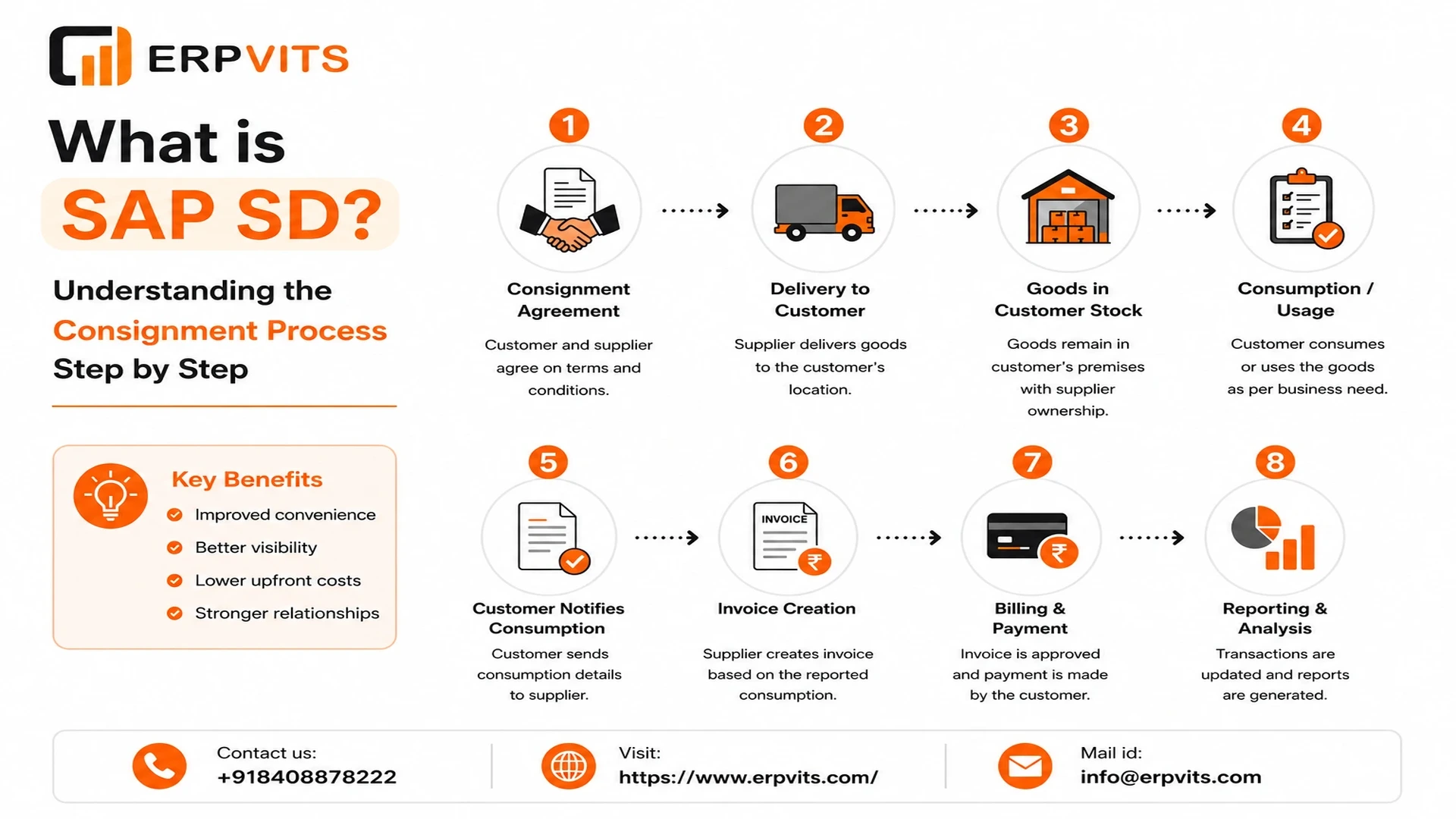
What is SAP SD? Understanding the Consignment Process Step by Step
SAP SD (Sales and Distribution) is among the most crucial modules of SAP ERP (Enterprise Resource Planning). It handles the entire business process associated with shipping, selling and the billing of goods and services. SAP SD helps companies handle the entire process of selling — beginning with an inquiry from the customer to providing the product and obtaining payments.
SAP SD works closely with other SAP modules such as MM (Materials Management), FI (Financial Accounting) as well as PP (Production Plan) to make sure that the business is running smoothly. It is extensively used in industries such as retail, manufacturing logistics, pharmaceuticals, and manufacturing.
In simpler terms, SAP SD answers three important business issues:
• Who is the person who purchases the product? (Customer Master Data)
• What is being offered? (Material Master Data)
• How much is it costing and then delivered, as well as billed? (Sales Process)
Why is SAP SD Important in Business? Key Features of SAP SD Module
SAP SD plays a vital function in the management of an effective business. For anyone exploring SAP SD training or planning a career in SAP, understanding why this module matters is the first step. Here is why it is crucial:
- It streamlines the entire sales process, from inquiry to the invoice
- It helps reduce manual errors in order processing and billing
- It allows businesses to track the orders of their customers in real-time
- It guarantees accurate pricing by using methods of condition
- It enhances customer satisfaction with quicker delivery and faster billing
- It gives complete sales reports to help make better business decision-making
Key Features of SAP SD Module
| Feature | Description |
|---|---|
| Sales Order Processing | Handles customer orders from the moment of creation until delivery |
| Pricing & Discounts | Automated price calculation based on condition types |
| Shipping & Delivery | Manages the movement of goods and delivery documents |
| Billing & Invoicing | Generates invoices, credit/debit memos and credit/debit notes |
| Credit Management | Limits on credit card purchases by customers are controlled |
| Returns Management | Refunds and customer returns |
| Reporting & Analytics | Reports on sales and dashboards |
SAP SD ensures that the correct product is available to the customer at the appropriate time and at the appropriate price, making it the foundation of any sales-driven company.
Core Components of SAP SD
SAP SD is built on many key components that work together to manage the entire sales cycle. Knowing these components is crucial to anyone who works using SAP SD — whether you are a fresher starting with SAP SD basics or an experienced SAP SD consultant handling live projects.
- Sales (SA) — Manages all pre-sales and sales actions, such as inquiries, quotes or sales requests. It is the beginning of the whole SD process.
- Shipping (LE-SHP) — When a sales order is accepted, the shipping component handles all delivery processes. It involves packing, picking items, goods issues, as well as the creation of delivery documents.
- Billing (BIL) — Creates invoices based upon orders or deliveries. It also handles debit memos as well as pro forma invoices.
- Pricing — SAP SD uses a condition method to automatically calculate pricing such as discounts, taxes and other surcharges according to established rules.
- Master Data — Master information forms the basis of SAP SD. It comprises:
- Customer Master — records all customer data
- Material Master — stores product details
- Pricing Conditions — stores pricing rules
- Customer Material Information Record — connects material and customer information
- Credit Management — Manages and monitors the exposure to credit of customers in order to limit the risk to the business's finances.
- Sales Information System (SIS) — Provides powerful reporting tools to assess the performance of sales, trends in customer behavior and demand for products.
Consignment Process in SAP SD
The consignment process in SAP SD is a unique business model in which the vendor (company) delivers products to the customer's address. However, the ownership of the items stays with the vendor until the buyer decides to use or sell them. The buyer only pays for the products they actually use, not everything they keep at their place.
This is a frequent process in the following industries:
- Medicines and pharmaceuticals — readily available in hospitals
- Products from retail stores — stocked in retail locations
- Automotive — spare parts stored at dealer locations
The consignment process helps create stronger relationships with clients by decreasing their financial risk and allowing them to access products at their own location.
What is Consignment in SAP SD?
Consignment in SAP SD means that the company stores its products in the warehouse of the customer or at a location without transferring ownership. The stock is tracked under consignment inventory in SAP. The customer is only charged when they remove (use or sell) the products out of their consignment stock.
Key Points of Consignment in SAP SD
- The physical location of the goods is the customer's premises
- Legal ownership remains with the selling company
- The stock is listed in SAP as special stock (consignment stock)
- Payment is activated only upon consumption or withdrawal
- Goods that have been used may be returned to the business
Consignment Stock Types in SAP
| Stock Type | Description |
|---|---|
| Consignment Stock at Customer | Goods at customer site, owned by company |
| Consignment Issue Stock | Goods consumed/withdrawn by customer |
| Consignment Return Stock | Goods returned by customer |
| Consignment Pick-Up Stock | Goods picked back by company |
Expert Guidance
Learn from industry experts
Trusted & Recognized
Top-rated by learners
Flexible Learning
Online options
Placement Support
Career support & more
Types of Consignment Process
SAP SD supports four main types of consignment procedures. Each type comes with a distinct movement type, order type and use. Understanding these types is essential for anyone preparing for an SAP SD interview or working on SAP SD configuration.
1. Consignment Fill-Up (KB)
- Goods are shipped to the address of the customer
- No billing is required at this stage
- Ownership remains with the company
Movement Type: 631 Order Type: KB
2. Consignment Issue (KE)
- The customer consumes or withdraws items from consignment inventory
- Billing is activated at this point
- Ownership shifts to the customer
Movement Type: 633 Order Type: KE
3. Consignment Return (KR)
- Returning unused items back to consignment inventory
- The billing process is reversed
- Goods return to consignment at the customer's site
Movement Type: 634 Order Type: KR
4. Consignment Pick-Up (KA)
- The company collects goods from the client's place of business
- Goods are returned to the company's warehouse
- No cost is involved
Movement Type: 632 Order Type: KA
SAP SD Job Roles and Responsibilities
SAP SD professionals are in great demand across all sectors. Whether you are looking at SAP SD jobs for freshers or senior-level SAP SD consultant roles, here is a quick review of all the key positions and the responsibilities they carry.
1. SAP SD Functional Consultant
The most commonly used SAP SD role, focused on configuration and implementation. | Experience: 2–5 Years | Transactions: VA01, VF01, VK11, VD01
- Analyze and gather business requirements
- Set up the SAP SD module to meet business needs
- Conduct User Acceptance Testing (UAT)
- Offer training for end users and support for go-live
2. SAP SD Senior Consultant
Controls complex scenarios and oversees project activities independently. | Experience: 5–9 Years | Key Skills: Gap Analysis, Solution Design
- Lead end-to-end SAP SD implementations
- Perform complex tasks such as consignment and intercompany processes
- Conduct blueprinting workshops with clients
- Mentor junior consultants
3. SAP SD Team Lead
Manages a team of consultants and oversees project delivery. | Experience: 8–12 Years | Key Skills: Team Management, Client Handling
- Direct and lead the team of SD consultants
- Review functional and configuration documents
- Manage client escalations and project status
- Ensure quality delivery on time
4. SAP SD Support Consultant
Manages day-to-day issues and tickets following go-live. | Experience: 1–4 Years | Tools: ServiceNow, JIRA, SAP Solution Manager
- Resolve L1 and L3 support tickets within SLA
- Conduct root cause analysis for recurring problems
- Handle minor configuration changes
- Coordinate with technical teams on ABAP solutions
5. SAP SD ABAP Developer
Manages all technical developments in SD customization. | Experience: 2–6 Years | Key Skills: ABAP, IDocs, User Exits, RFC
- Create custom reports, SmartForms and Adobe Forms
- Write User Exits, BADIs and Enhancements
- Develop EDI/IDOC interfaces for SD integration
- Facilitate data migration with LSMW or BDC
6. SAP SD Project Manager
Manages the complete SAP SD project from planning through delivery. | Experience: 10–15 Years | Key Skills: PMP, Leadership, Risk Management
- Define project scope, timeline and budget
- Control risks, issues and stakeholder communication
- Supervise testing, training and go-live activities
- Ensure compliance with SAP Activate methodology
Job Roles Summary
| Job Role | Experience | Key Focus |
|---|---|---|
| Functional Consultant | 2–5 Years | Configuration & Testing |
| Senior Consultant | 5–9 Years | Solution Design |
| Team Lead | 8–12 Years | Team & Delivery Management |
| Support Consultant | 1–4 Years | Ticket Resolution |
| ABAP Developer | 2–6 Years | Technical Development |
| Project Manager | 10–15 Years | Project Planning & Delivery |
Step by Step Consignment Process Flow
Here is the complete step-by-step consignment process flow in SAP SD. This is one of the most commonly asked topics in SAP SD interviews and a core part of any SAP SD course curriculum.
Step 1 — Consignment Fill-Up (KB)
- Customer agrees to retain consignment stock
- Sales order is created with order type KB
- Delivery document is created
- Goods Issue is released — stock moves from company warehouse to customer consignment stock
- No invoice is generated at this stage
Step 2 — Consignment Issue (KE)
- The customer sells or uses the consignment items
- Sales order is created using order type KE
- Delivery document is created
- Goods Issue is released — stock transfers from consignment stock into customer ownership
- Invoice is generated and delivered to the customer
Step 3 — Consignment Return (KR) (if needed)
- Customer wants to return unopened products
- Return order is created using order type KR
- Goods are transferred back into consignment stock
- Credit memo is issued to the customer
Step 4 — Consignment Pick-Up (KA) (if needed)
- Company decides to retrieve items from the customer's site
- Order is created using order type KA
- Goods are returned to the company's warehouse
- No credit memo or billing is involved
What is FI SD Integration?
FI SD integration refers to the seamless connection between SAP SD (Sales and Distribution) and SAP FI (Financial Accounting) modules. When a billing document is generated in SAP SD, it automatically creates the accounting records in SAP FI without any manual intervention. This is one of the most important concepts covered in any SAP SD and FI training program.
- Every sale is entered into the financial books automatically
- Revenue is correctly recognized in the right accounts
- Accounts receivable of the customer are updated in real-time
- Tax entries are correctly posted
- The month-end closing process is quicker and free of errors
Key Configuration Elements in FI SD Integration
- Account Determination — connects SD condition types to FI GL accounts
- Chart of Accounts — describes the GL accounts used for posting
- Condition Types — pricing elements such as price, tax and discount
- Access Sequence — determines which GL account to use
- Account Keys — map SD transactions to FI accounts (e.g.,
ERLfor revenue,ERSfor sales deductions)
The integration takes place automatically when an invoice document is created within SAP SD. The system checks the account determination settings and then posts the appropriate entries to SAP FI.
Key Posting Entries in FI SD Integration
When a billing document is created in SAP SD, the following key accounting entries are automatically posted in SAP FI:
1. Standard Sales Invoice Posting
| Entry | Account Type | Debit/Credit |
|---|---|---|
| Customer Account | Accounts Receivable | Debit |
| Revenue Account | Sales Revenue | Credit |
| Tax Account | Output Tax (GST/VAT) | Credit |
2. Credit Memo Posting (Customer Return)
| Entry | Account Type | Debit/Credit |
|---|---|---|
| Revenue Account | Sales Revenue | Debit |
| Tax Account | Output Tax | Debit |
| Customer Account | Accounts Receivable | Credit |
3. Consignment Issue Billing Posting
| Entry | Account Type | Debit/Credit |
|---|---|---|
| Customer Account | Accounts Receivable | Debit |
| Consignment Revenue | Revenue Account | Credit |
| GST/Tax Account | Output Tax | Credit |
Common Account Keys Used
| Account Key | Description |
|---|---|
ERL | Revenue from Sales |
ERS | Sales Deductions |
ERF | Freight Revenue |
MWS | Output Tax |
EVV | Cash Settlement |
These postings happen instantly and automatically when the billing document is saved, ensuring real-time financial accuracy.
Common Issues in FI SD Integration
Although it is a robust integrated system, FI SD integration can sometimes run into difficulties. These are also frequently discussed in SAP SD support roles and covered in detail during SAP SD certification preparation. Here are the most common problems and their solutions:
1. Account Determination Error
VKOAVKOA2. Pricing Condition Type Not Mapped
V/083. Customer Reconciliation Account Missing
XD024. Tax Code Error
5. Billing Block Issue
VA02 or VF026. Exchange Rate Issues
OB087. Consignment Billing Not Generating
VOV7