
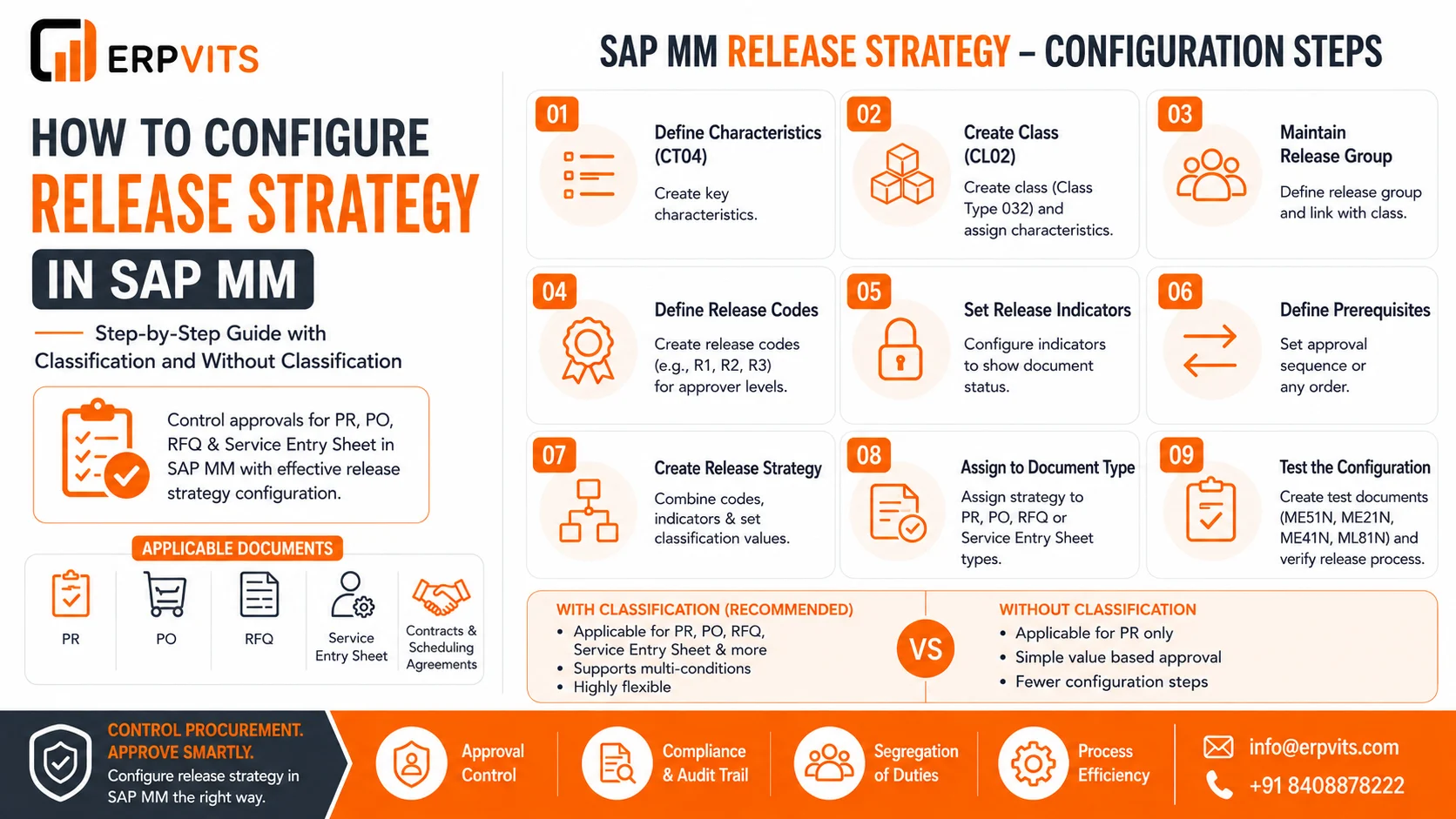
How to configure releases in SAP MM. Step-by step Guide with Classification as well as without Classification
Any company that purchases materials or services from SAP must have a method to monitor who approves what and for what price. The control mechanism used is"the release strategy within the SAP MM. If it is not in place, purchasing orders, order forms, purchase requests or service sheets can be processed without management oversight, which could expose the company to risk in the financial sector, reckless expenditure, as well as compliance issues.
This guide explains the release strategy configuration within SAP the MM in depth, covering both the classification-based method and the more straightforward non-classification approach. No matter if you're a SAP MM consultant, a functional analyst, or procurement manager trying to figure out the way approvals function in the background, this guide provides a clear guideline for configuring the release strategy, test it and troubleshoot release strategy issues.
What Is Release Strategy in SAP MM?
The release strategy within SAP MM is an instrument for configuration that allows you to establish an approval process for procurement documents like purchase requests (PR) and buy orders (PO) and request for quote (RFQ) and sheet of service entries. It defines the levels of approval the document has to pass through before it is accepted and usable within the system.
In simplest terms an effective release strategy can answer three concerns:
- What type of document is required for approval?
- Who is the person who approves and what order does it appear in?
- What circumstances (value plant, value organization material group, etc.).) determine a particular approval pathway?
When a release strategy has been assigned to a document that document will be unprocessed such as printing or mailing to a vendor or even a receipt for goods until the authorization (approval) code is cleared.
Why Release Strategy Matters in Procurement
Before we get into the configuration steps, it is helpful to know why companies invest time to make sure that this is set up properly:
- Control of finances High-value purchases are automatically send approvals to senior officials.
- Audit conformance Each approval step is documented, resulting in an audit trail that is clear.
- Segregation of tasks prevents an individual user from approving and creating the identical document.
- Method standardization assures consistent approval procedures across different departments, factories or purchasing companies.
- Prevention of fraud reduces the risk of duplicate or unauthorised purchase.
With these advantages, almost all SAP MM implementation has the release strategy as a fundamental component of the blueprint for procurement.
Two Approaches: With Classification and Without Classification
SAP MM offers two distinct ways to design a release strategies, and selecting the best one is contingent on the number of approval requirements your company requires.
| Aspect | Release Strategy Without Classification | Release Strategy With Classification |
|---|---|---|
| Applicable document | Purchase Requisition is only for | PR, PO, RFQ, Service Entry Sheet, Contracts, Scheduling Agreements |
| Complexity of configuration | Simple, fewer steps | Requires class, characteristics and a communication structure |
| Flexibility | Limitations on conditions | Highly flexible, it can handle multiple conditions. |
| Use the case | Small-sized organizations that have simple approval requirements | Large-sized companies with complicated multi-level approvals |
| SAP Transaction Codes | OMGQ along with related SPRO nodes | CT04, CL02 OMGS CL24N, CT04, and many more |
Let's examine both approaches in greater detail.
Release Strategy in SAP MM Without Classification
This approach is applicable just to buy requests which is more straightforward one of two. It doesn't rely on any characteristics or classes; instead, it rely directly on codes, release groups and basic value-based requirements which are set in a fixed table.
Steps to Configure Release Strategy Without Classification
Step 1. Create a Release Group Visit SPRO Materials Management - Purchase Requisition - Purchase - Release procedure / Procedure that does not require Classification. Set up the Procedure without classification. This is where you identify the Release Group (e.g. R1) and give it a name.
Step 2. Determine release codes Release codes (approval levels) like R1, R2, and R3 for the group responsible for release. Each code is typically an approval role, such as department director or finance manager.
Step 3. Determine Release Indicate Set the indicator that indicates release to display the status of the document either block, partly released or completely released.
Step 4. Define the Release Strategy The codes and release group into a strategy, and then set values limit (from-to) in each one to ensure that the system can determine which value bracket is responsible for which approval route.
Step 5. Create Release Strategy Document Type The strategy is linked to the appropriate document type for purchase requisitions to ensure that it is activated automatically each time the PR that is eligible is created.
Step 6. Check the configuration Create an initial purchase request (ME51N) that falls within the specified value range. Once you've confirmed that the release strategy triggers and then simulate the approval by using ME54N transaction.
Limitations of the Non-Classification Method
Although it is simple, this approach is not without a drawback that it only works with purchase requisitions, and has only a limited mix logic. It is not able to account for different dimensions such as buying group, plant and material group all at once. To ensure that this level of control is maintained the use of a classification-based release strategy is necessary.
Release Strategy With Classification in SAP MM
It is the most popular and effective method that can be applied to purchase requests, purchase orders contracts, RFQs, scheduling agreements, as well as service sheet entries. It utilizes an algorithm for classification (characteristics and class) to construct the multi-condition approval logic.
Key Building Blocks
Before configuring, it's essential to be aware of the components that are involved:
- Characteristics (CT04) - Fields like total value, purchase organization, plant materials group or type of document that the system analyzes.
- Class (CL02) - A container (class type 032 for release strategy) that ties the attributes together.
- Release Group Grouping by logic of release strategy, similar to the non-classification approach.
- Release codes - Represent individual approvals.
- Release indicator shows blocked or released status at every stage.
- Requirements for Release Defines whether release codes need to be performed in a sequential manner or may occur in any sequence.
- release strategy - The final approval process is based on an amalgamation of the above.
Step-by-Step: How to Create Release Strategy in SAP MM (With Classification)
Step 1: Design characteristics (Transaction CT04) Create characteristics such as ZBSART (document kind), ZWERKS (plant), ZEKGRP (purchasing group) and GNETW (net order value). These characteristics pull information from the structure of communication CEKKO to create PO/PR and the CESSR for the service entry sheets.
Step 2 Create an class (Transaction CL02) Create a class with the Class Type 032 as the base and then attach all the properties developed in Step 1.
Step 3. Keep Release Groups up-to date Visit SPRO Materials Management - Purchase Order (or Purchase Requisition) Release Procedure Classification Procedure - Setup Procedure with Classification Release Groups. Create a release group and connect this group to the class that was created earlier.
4. Keep Release Codes Create distinct release codes for the level of approval for each person for each approver level, like R1 for department manager, and R2 for the head of procurement.
5. Keep Release Indicators Create indicators that represent the current release status of the document such as "blocked," "released," or "changeable after release."
6. Keep Release Prerequisites Determine if approval codes should be applied in a strict sequence (R1 prior to R2) or in a separate manner.
7. Determine the Release Strategy The primary step. Each release plan (e.g., S1, S2, S3):
- Release codes to be assigned
- Assign indicators of release
- Create release requirements
- Create the classification criteria (e.g. Value > Rs5,00,000 and plant > 1000)
Step 8 Step 8: Assign Release Strategy to Document Type Link each strategy with the appropriate PO (PO, PR, RFQ) and/or service entry form type of document to ensure that the system evaluates the documents received in accordance with the specified requirements.
Step 9 Step 9: Start and test Design a testing file (PR using ME51N. PO through ME21N RFP via ME41N or a service entry form via ML81N) that is in line with the classification values. Also, confirm that the proper release strategy and approval sequence triggers in the manner that is would be expected.
PO Release Strategy Configuration in SAP MM
The PO release method within SAP MM uses the classification technique that was previously described, however there are a few additional points specific to purchase orders.
- The communication format that is used for communication is CEKKO that draws PO header fields such as net value, buying group, organization plant, net value, and document type.
- The PO release strategy is implemented at the header level (not for line items).
- After release, any modification to the key fields such as value or assignment to an account could cause an reset of the release which will send the PO back for approval re-appointmentThis is managed through the settings for release indicators.
- It's a common practice to be aligned PO release strategy value bands to the organisation's Delegation of Authority (DoA) matrix, which means that limits for approval mirror the finance policy precisely.
Release Strategy for PR in SAP MM
A release plan for PR within SAP The Release strategy for PR in SAP MM can be implemented using or without classification however, classification is preferred for companies with multiple plants buying groups, purchase groups, or categories of materials. Important considerations
- The structure of communication CEKKO can be employed for PR too.
- The PR release strategy usually has more precise value bands than PO since REQUISitions are the primary checkpoint prior to buying.
- Some companies set up two-tier release releases that includes PR at the time of requisition and PO and PO at the ordering stage providing two levels of control on the amount.
Release Strategy for RFQ in SAP MM
Strategy for release of RFQs within SAP MM is less frequently configured than PO or PR because RFQs are usually documents that are used to make commitments. However, companies handling massive tenders or vendor negotiations usually create it to facilitate governance:
- Configuration is based on the same classification steps.
- The focus is usually on the estimated value, purchasing structure, and RFQ document kind.
- It makes sure that only authorized employees can issue RFQs to vendors outside of the organization as well as protect pricing sensitive and negotiation information for vendors.
Release Strategy for Service Entry Sheet in SAP MM
The release plan for the service entry sheets within SAP MM regulates the approval of the actual services performed and verified against a PO. This is a crucial control element because sheet entries for service management directly initiate the verification of invoices.
- The communication format used here is the CESSR which is different from the PO/PR model.
- The class type is 032, but the attributes are designed specifically for fields on the service entry sheet like total value as well as reference to a service PO.
- This release strategy can be configured via SPRO Materials Management - External Services Management - Service Entry Sheet - Setting up the Release Process for Sheets of Service.
- This ensures that the person who is confirming the service isn't the same person who approves payment and ensuring segregation of tasks for procurement based on services.
Common Configuration Mistakes to Avoid
Even the most experienced consultants can have to deal with these issues as they decide on a release strategy for SAP MM:
- Values of classification that overlap If two different strategies share the same value range as well as plant mixtures, then the program generates an error while creating the document.
- Values for characteristic that are missing If a particular characteristic for release strategies isn't retained in the transaction and the strategy does not be triggered at all.
- An incorrect release indicator setup The incorrect indicator could allow the processing of a document prior to full release.
- Inadvertently updating the table of class characteristic values (CL24N) - This process links the actual values to specific strategies, and is often ignored.
- Testing with unrealistic values Tests using data that isn't based on actual business volumes may hide the configuration flaws that show up later in the process.
How to Delete Release Strategy in SAP MM
There are instances that a release plan becomes obsolete, perhaps because of a restructuring or revision to the approval matrix or amalgamation of two purchasing teams. Here's how to remove releases in SAP in MM securely:
First step: Search for open Documents Before deleting make sure that there are no open POs, PRs, or entry sheet for service are employing the strategy. The removal of a strategy that is tied to documents that are open can lead to processing mistakes.
Second Step: Go into the configuration Node Visit SPRO Materials Management Purchase (or Purchase Request) Release Procedure Method with or without classification and Release Strategies.
Third Step: Choose the Strategy Select the specific release strategy that you wish to get rid of.
step 4: Deleting the entry Utilize an icon to delete or menu to eliminate the line of strategy. The system will ask for confirmation.
5. Disable the Classification Values associated with it (If applicable) For classification-based strategies Also, go to CL24N to unassign the value combination associated with the strategy prior to removing it from the configuration, in order to ensure that there are no orphaned classification records.
Step 6 Step 6: Save and Transport Save the changes and then move it through the standard process of transport requests to ensure the sameness across your development, quality and production environments.
How to Remove Release Strategy in SAP MM (Temporary Deactivation)
Sometimes, you don't need to delete an entire strategy, but you may require to eliminate the release strategy from SAP MM temporarily, such as in the course of a policy review. In this case:
- Instead of eliminating the configuration, you can adjust the range of values for classification so that there is no document that matches the criteria of the strategy.
- Alternately, you can take the assignment of the strategy from the appropriate document type, but not deleting the record of the strategy, which permits rapid reactivation later.
- Record the change in an explicit business reason as this will impact the approval control process and can be reviewed during audits.
SAP MM Release Strategy: Frequently Asked Questions
What's the distinction between release strategy that includes classification and one without the classification of SAP MM? Release strategy without classification only works for purchase requisitions. It uses simple rules based on values. The release strategy that uses classification is suitable for PO, PR contracts, RFQs with scheduling agreements, service entry sheets. It also allows multiple conditions to be combined using the characteristics and classes.
What code for transactions is used to define the release strategy in SAP MM? Configuration mainly happens via SPRO routes within Materials Management - Purchase - Release Procedure. The transactions that support it comprise CT04 (characteristics) CL02 (class) as well as CL24N (classification values).
Does release strategy have the ability to be used to create purchase orders in SAP the MM? Yes. The release strategy for purchase orders within SAP MM uses the classification method to evaluate fields such as net value plant, purchasing organization and the type of document from CEKKO. CEKKO Communication Structure.
What is the reason my strategy for release not activating upon a purchase requisition, or the purchase of a product? The most common reason is that there are no particular values in the document, overlaps in classification ranges, or the method is not assigned to the right document type.
What number of release codes can be utilized in a single release plan? SAP allows up to eight release codes per release strategy, which means that a document could go through up to eight simultaneous or sequential approval levels.
Do changes to a published purchase order require a re-approval? It depends on the configuration of the release indicator. If crucial fields such as the value of an account or its assignment are changed beyond an acceptable limit, then the software will reset the status of release and send the PO back to the approval process.
Release strategy can be set up for service entry sheets within SAP MM? Yes. The release strategy for the service entry sheets in SAP MM employs the CESSR structure for communication and is separate from PR/PO release strategy. External Services Management.
Does it make sense to use various release methods for the different plant within SAP MM? Yes, plant is a popular characteristic of a release strategies based on classification, which allows distinct approval hierarchies for various plant types within the same code.
Conclusion
The setting of release strategy in SAP MM, whether with or without classificationis among the most critical governance mechanisms within the process of procurement. The non-classification strategy is suitable for companies that require only an approval based on value for purchase requisitions. On the other hand, the classification-based method provides the flexibility required by larger organizations that have multiple purchasing groups, facilities and different types of documents such as PR PO, RFQ, and service entry sheets.
The correct configuration of this by defining the traits and classes to establishing releases groups, codes and indicators -- will ensure that every procurement document gets through the proper hands before it can be taken into action. Knowing how to remove or delete an release strategy without risk is as crucial as establishing one and ensuring that approval policies change over time.
For companies looking to implement SAP S/4HANA MM or seeking to enhance the current procurement workflow mastering the release strategy configuration is an essential capability that will directly aid in financial control, compliance and efficiency of the process.